conan graph build-order
$ conan graph build-order -h
usage: conan graph build-order [-h] [-f FORMAT] [--out-file OUT_FILE]
                               [-v [{quiet,error,warning,notice,status,verbose,debug,v,trace,vv}]]
                               [-cc CORE_CONF] [-b BUILD] [-r REMOTE | -nr]
                               [-u [UPDATE]] [-pr PROFILE]
                               [-pr:b PROFILE_BUILD] [-pr:h PROFILE_HOST]
                               [-pr:a PROFILE_ALL] [-o OPTIONS]
                               [-o:b OPTIONS_BUILD] [-o:h OPTIONS_HOST]
                               [-o:a OPTIONS_ALL] [-s SETTINGS]
                               [-s:b SETTINGS_BUILD] [-s:h SETTINGS_HOST]
                               [-s:a SETTINGS_ALL] [-c CONF] [-c:b CONF_BUILD]
                               [-c:h CONF_HOST] [-c:a CONF_ALL]
                               [--requires REQUIRES]
                               [--tool-requires TOOL_REQUIRES] [--name NAME]
                               [--version VERSION] [--user USER]
                               [--channel CHANNEL] [-l LOCKFILE]
                               [--lockfile-partial]
                               [--lockfile-out LOCKFILE_OUT]
                               [--lockfile-clean]
                               [--lockfile-overrides LOCKFILE_OVERRIDES]
                               [--order-by {recipe,configuration}] [--reduce]
                               [path]

Compute the build order of a dependency graph.

positional arguments:
  path                  Path to a folder containing a recipe (conanfile.py or
                        conanfile.txt) or to a recipe file. e.g.,
                        ./my_project/conanfile.txt. Defaults to the current
                        directory when no --requires or --tool-requires is
                        given

options:
  -h, --help            show this help message and exit
  -f FORMAT, --format FORMAT
                        Select the output format: json, html
  --out-file OUT_FILE   Write the output of the command to the specified file
                        instead of stdout.
  -v [{quiet,error,warning,notice,status,verbose,debug,v,trace,vv}]
                        Level of detail of the output. Valid options from less
                        verbose to more verbose: -vquiet, -verror, -vwarning,
                        -vnotice, -vstatus, -v or -vverbose, -vv or -vdebug,
                        -vvv or -vtrace
  -cc CORE_CONF, --core-conf CORE_CONF
                        Define core configuration, overwriting global.conf
                        values. E.g.: -cc core:non_interactive=True
  -b BUILD, --build BUILD
                        Optional, specify which packages to build from source.
                        Combining multiple '--build' options on one command
                        line is allowed. Possible values: --build=never
                        Disallow build for all packages, use binary packages
                        or fail if a binary package is not found, it cannot be
                        combined with other '--build' options. --build=missing
                        Build packages from source whose binary package is not
                        found. --build=cascade Build packages from source that
                        have at least one dependency being built from source.
                        --build=[pattern] Build packages from source whose
                        package reference matches the pattern. The pattern
                        uses 'fnmatch' style wildcards, so '--build="*"' will
                        build everything from source. --build=~[pattern]
                        Excluded packages, which will not be built from the
                        source, whose package reference matches the pattern.
                        The pattern uses 'fnmatch' style wildcards.
                        --build=missing:[pattern] Build from source if a
                        compatible binary does not exist, only for packages
                        matching pattern. --build=compatible:[pattern]
                        (Experimental) Build from source if a compatible
                        binary does not exist, and the requested package is
                        invalid, the closest package binary following the
                        defined compatibility policies (method and
                        compatibility.py)
  --requires REQUIRES   Directly provide requires instead of a conanfile
  --tool-requires TOOL_REQUIRES
                        Directly provide tool-requires instead of a conanfile
  --order-by {recipe,configuration}
                        Select how to order the output, "recipe" by default if
                        not set.
  --reduce              Reduce the build order, output only those to build.
                        Use this only if the result will not be merged later
                        with other build-order

remote arguments:
  -r REMOTE, --remote REMOTE
                        Look in the specified remote or remotes server
  -nr, --no-remote      Do not use remote, resolve exclusively in the cache
  -u [UPDATE], --update [UPDATE]
                        Will install newer versions and/or revisions in the
                        local cache for the given reference name, or all
                        references in the graph if no argument is supplied.
                        When using version ranges, it will install the latest
                        version that satisfies the range. It will update to
                        the latest revision for the resolved version range.

profile arguments:
  -pr PROFILE, --profile PROFILE
                        Apply the specified profile. By default, or if
                        specifying -pr:h (--profile:host), it applies to the
                        host context. Use -pr:b (--profile:build) to specify
                        the build context, or -pr:a (--profile:all) to specify
                        both contexts at once
  -pr:b PROFILE_BUILD, --profile:build PROFILE_BUILD
  -pr:h PROFILE_HOST, --profile:host PROFILE_HOST
  -pr:a PROFILE_ALL, --profile:all PROFILE_ALL
  -o OPTIONS, --options OPTIONS
                        Apply the specified options. By default, or if
                        specifying -o:h (--options:host), it applies to the
                        host context. Use -o:b (--options:build) to specify
                        the build context, or -o:a (--options:all) to specify
                        both contexts at once. Example:
                        -o="pkg/*:with_qt=True"
  -o:b OPTIONS_BUILD, --options:build OPTIONS_BUILD
  -o:h OPTIONS_HOST, --options:host OPTIONS_HOST
  -o:a OPTIONS_ALL, --options:all OPTIONS_ALL
  -s SETTINGS, --settings SETTINGS
                        Apply the specified settings. By default, or if
                        specifying -s:h (--settings:host), it applies to the
                        host context. Use -s:b (--settings:build) to specify
                        the build context, or -s:a (--settings:all) to specify
                        both contexts at once. Example: -s="compiler=gcc"
  -s:b SETTINGS_BUILD, --settings:build SETTINGS_BUILD
  -s:h SETTINGS_HOST, --settings:host SETTINGS_HOST
  -s:a SETTINGS_ALL, --settings:all SETTINGS_ALL
  -c CONF, --conf CONF  Apply the specified conf. By default, or if specifying
                        -c:h (--conf:host), it applies to the host context.
                        Use -c:b (--conf:build) to specify the build context,
                        or -c:a (--conf:all) to specify both contexts at once.
                        Example:
                        -c="tools.cmake.cmaketoolchain:generator=Xcode"
  -c:b CONF_BUILD, --conf:build CONF_BUILD
  -c:h CONF_HOST, --conf:host CONF_HOST
  -c:a CONF_ALL, --conf:all CONF_ALL

reference arguments:
  --name NAME           Provide a package name if not specified in conanfile
  --version VERSION     Provide a package version if not specified in
                        conanfile
  --user USER           Provide a user if not specified in conanfile
  --channel CHANNEL     Provide a channel if not specified in conanfile

lockfile arguments:
  -l LOCKFILE, --lockfile LOCKFILE
                        Path to a lockfile. Use --lockfile="" to avoid
                        automatic use of existing 'conan.lock' file
  --lockfile-partial    Do not raise an error if some dependency is not found
                        in lockfile
  --lockfile-out LOCKFILE_OUT
                        Filename of the updated lockfile
  --lockfile-clean      Remove unused entries from the lockfile
  --lockfile-overrides LOCKFILE_OVERRIDES
                        Overwrite lockfile overrides
命令 conan graph build-order 计算指定在 path 或 --requires/--tool-requires 中的配方的依赖图的构建顺序。
有两个重要的参数会影响此构建顺序的计算方式
参数
--order-by可以取 2 个值recipe和configuration,具体取决于我们希望如何构建和并行化我们的 CI。参数
--reduce将剥离顺序中所有不需要从源代码构建的包。
默认情况下,conan graph build-order 将返回完整依赖图的顺序,并为每个元素标注需要执行的操作,例如,如果二进制文件已在 Conan 缓存中并且不需要从源代码构建,则标注 "binary": "Cache",如果需要从源代码构建,则标注 "binary": "Build"。 如果我们想稍后将多个构建顺序合并成一个,则拥有完整的顺序是必要的,因为拥有完整的信息可以保留相对顺序,否则会丢失和破坏。 因此,只有当我们直接使用结果进行构建时,才应使用参数 --reduce,而如果计划稍后将结果构建顺序与其他构建顺序合并,则不应使用该参数。
让我们考虑安装 libpng 并希望查看按配方排序的此需求的构建顺序
警告
请注意,从 Conan 2.1.0 开始,建议使用 –order-by 参数,并且不使用该参数已被弃用。 该参数将在不久的将来被删除。 为保持向后兼容性而保留。 请注意,如果您使用 –order-by 参数,JSON 输出将不同,从一个简单的列表变为包含扩展信息的字典。
$ conan graph build-order --requires=libpng/1.5.30 --format=json --order-by=recipe
...
======== Computing the build order ========
{
    "order_by": "recipe",
    "reduced": false,
    "order": [
        [
            {
                "ref": "zlib/1.3#06023034579559bb64357db3a53f88a4",
                "depends": [],
                "packages": [
                    [
                        {
                            "package_id": "d62dff20d86436b9c58ddc0162499d197be9de1e",
                            "prev": "54b9c3efd9ddd25eb6a8cbf01860b499",
                            "context": "host",
                            "binary": "Cache",
                            "options": [],
                            "filenames": [],
                            "depends": [],
                            "overrides": {},
                            "build_args": null
                        }
                    ]
                ]
            }
        ],
        [
            {
                "ref": "libpng/1.5.30#ed8593b3f837c6c9aa766f231c917a5b",
                "depends": [
                    "zlib/1.3#06023034579559bb64357db3a53f88a4"
                ],
                "packages": [
                    [
                        {
                            "package_id": "60778dfa43503cdcda3636d15124c19bf6546ae3",
                            "prev": "ad092d2e4aebcd9d48a5b1f3fd51ba9a",
                            "context": "host",
                            "binary": "Download",
                            "options": [],
                            "filenames": [],
                            "depends": [],
                            "overrides": {},
                            "build_args": null
                        }
                    ]
                ]
            }
        ]
    ],
    "profiles": {
        "self": {
            "args": ""
        }
    }
}
首先,我们可以看到 zlib 包,因为 libpng 依赖于它。 输出按配方排序,如我们使用 –order-by 参数所传递的那样;但是,我们可能更希望按配置排序。 为此,请使用带有值 configuration 的 –order-by 参数。
在 json 的末尾,在 order 字段之后,我们看到一个 profiles 字段,其中包含与当前“build-order”相关的命令行参数的配置文件。 在这种情况下,由于我们没有提供任何参数,因此它是空的。 但是,如果我们使用类似 conan graph build-order ... -pr=default -s build_type=Debug > bo.json 的命令,则 args 将包含这些参数(带有 json 字符转义):"args": "-pr:h=\"default\" -s:h=\"build_type=Debug\""
使用 --order-by=configuration,我们将获得不同的构建顺序格式
$ conan graph build-order --requires=libpng/1.5.30 --format=json --order-by=configuration
...
======== Computing the build order ========
{
    "order_by": "configuration",
    "reduced": false,
    "order": [
        [
            {
                "ref": "zlib/1.3#06023034579559bb64357db3a53f88a4",
                "pref": "zlib/1.3#06023034579559bb64357db3a53f88a4:d62dff20d86436b9c58ddc0162499d197be9de1e#54b9c3efd9ddd25eb6a8cbf01860b499",
                "package_id": "d62dff20d86436b9c58ddc0162499d197be9de1e",
                "prev": "54b9c3efd9ddd25eb6a8cbf01860b499",
                "context": "host",
                "binary": "Cache",
                "options": [],
                "filenames": [],
                "depends": [],
                "overrides": {},
                "build_args": null
            }
        ],
        [
            {
                "ref": "libpng/1.5.30#ed8593b3f837c6c9aa766f231c917a5b",
                "pref": "libpng/1.5.30#ed8593b3f837c6c9aa766f231c917a5b:60778dfa43503cdcda3636d15124c19bf6546ae3#ad092d2e4aebcd9d48a5b1f3fd51ba9a",
                "package_id": "60778dfa43503cdcda3636d15124c19bf6546ae3",
                "prev": "ad092d2e4aebcd9d48a5b1f3fd51ba9a",
                "context": "host",
                "binary": "Download",
                "options": [],
                "filenames": [],
                "depends": [
                    "zlib/1.3#06023034579559bb64357db3a53f88a4:d62dff20d86436b9c58ddc0162499d197be9de1e#54b9c3efd9ddd25eb6a8cbf01860b499"
                ],
                "overrides": {},
                "build_args": null
            }
        ]
    ]
}
如果现在应用 --reduce
$ conan graph build-order --requires=libpng/1.5.30 --reduce --format=json --order-by=configuration
...
======== Computing the build order ========
{
    "order_by": "configuration",
    "reduced": false,
    "order": []
}
由于这里没有要构建的二进制文件,所有二进制文件都已经存在。 如果我们明确强制构建一些,则结果将仅包含那些将被构建的。
$ conan graph build-order --requires=libpng/1.5.30 --build="libpng/*" --reduce --format=json --order-by=configuration
...
======== Computing the build order ========
{
    "order_by": "configuration",
    "reduced": false,
    "order": [
        [
            {
                "ref": "libpng/1.5.30#ed8593b3f837c6c9aa766f231c917a5b",
                "pref": "libpng/1.5.30#ed8593b3f837c6c9aa766f231c917a5b:60778dfa43503cdcda3636d15124c19bf6546ae3#ad092d2e4aebcd9d48a5b1f3fd51ba9a",
                "package_id": "60778dfa43503cdcda3636d15124c19bf6546ae3",
                "prev": null,
                "context": "host",
                "binary": "Build",
                "options": [],
                "filenames": [],
                "depends": [],
                "overrides": {},
                "build_args": "--require=libpng/1.5.30 --build=libpng/1.5.30"
            }
        ]
    ]
}
然后它将仅包含 binary=Build 节点,而不包含其余节点。 请注意,它还将提供一个 build_args 字段,其中包含用于在 CI 代理中触发此包构建的 conan install <args> 的参数。
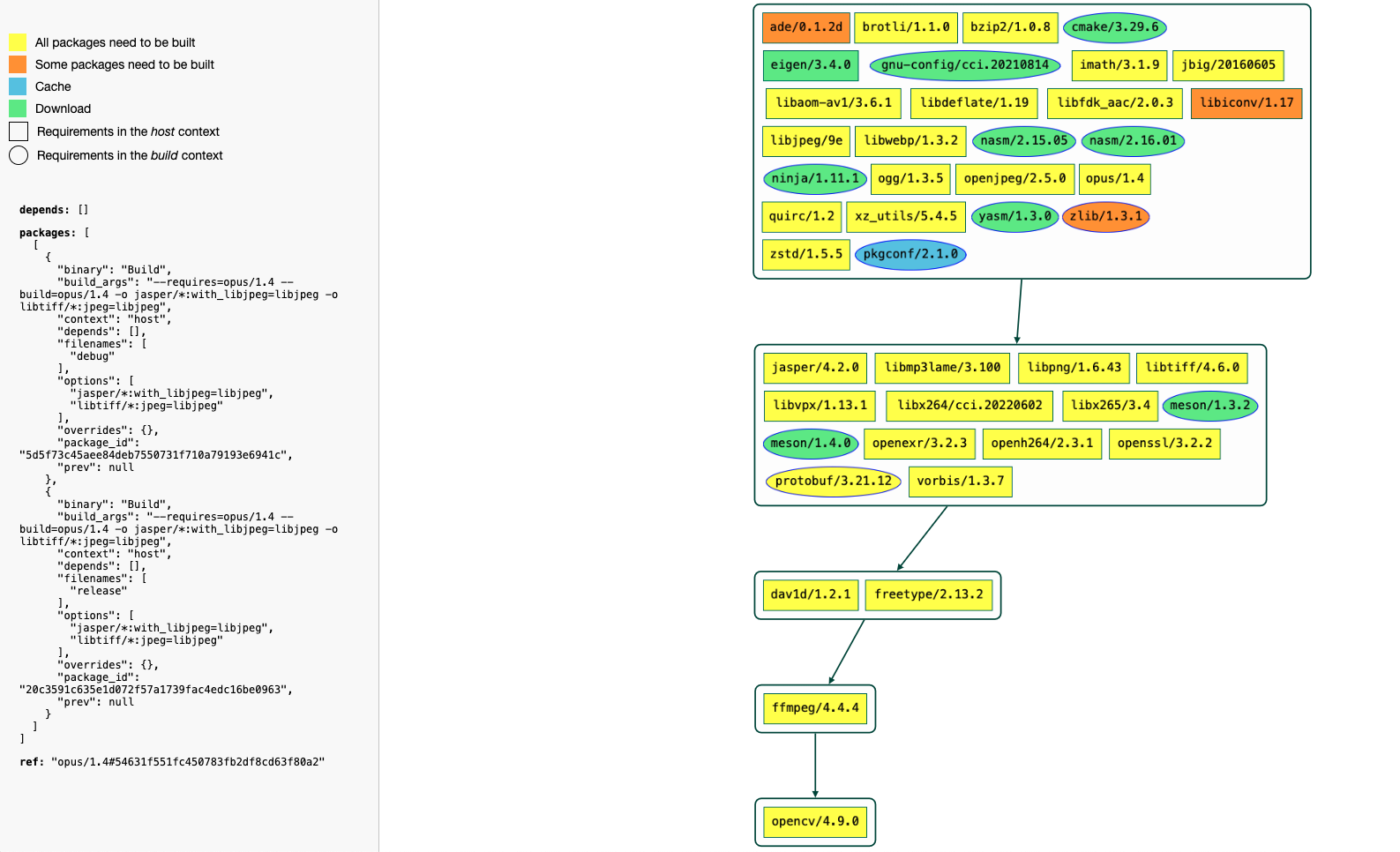
获取构建顺序的可视化表示
您可以使用 HTML 格式化程序获得构建顺序的可视化表示。 例如
$ conan graph build-order --requires=opencv/4.9.0 --order-by=recipe --build=missing --format=html > build-order.html